
Why I Switched to UniFi for My Homelab (And What It Enabled)
How replacing consumer networking gear with UniFi unlocked VLANs, better visibility, and a production-like foundation for Proxmox and Kubernetes.
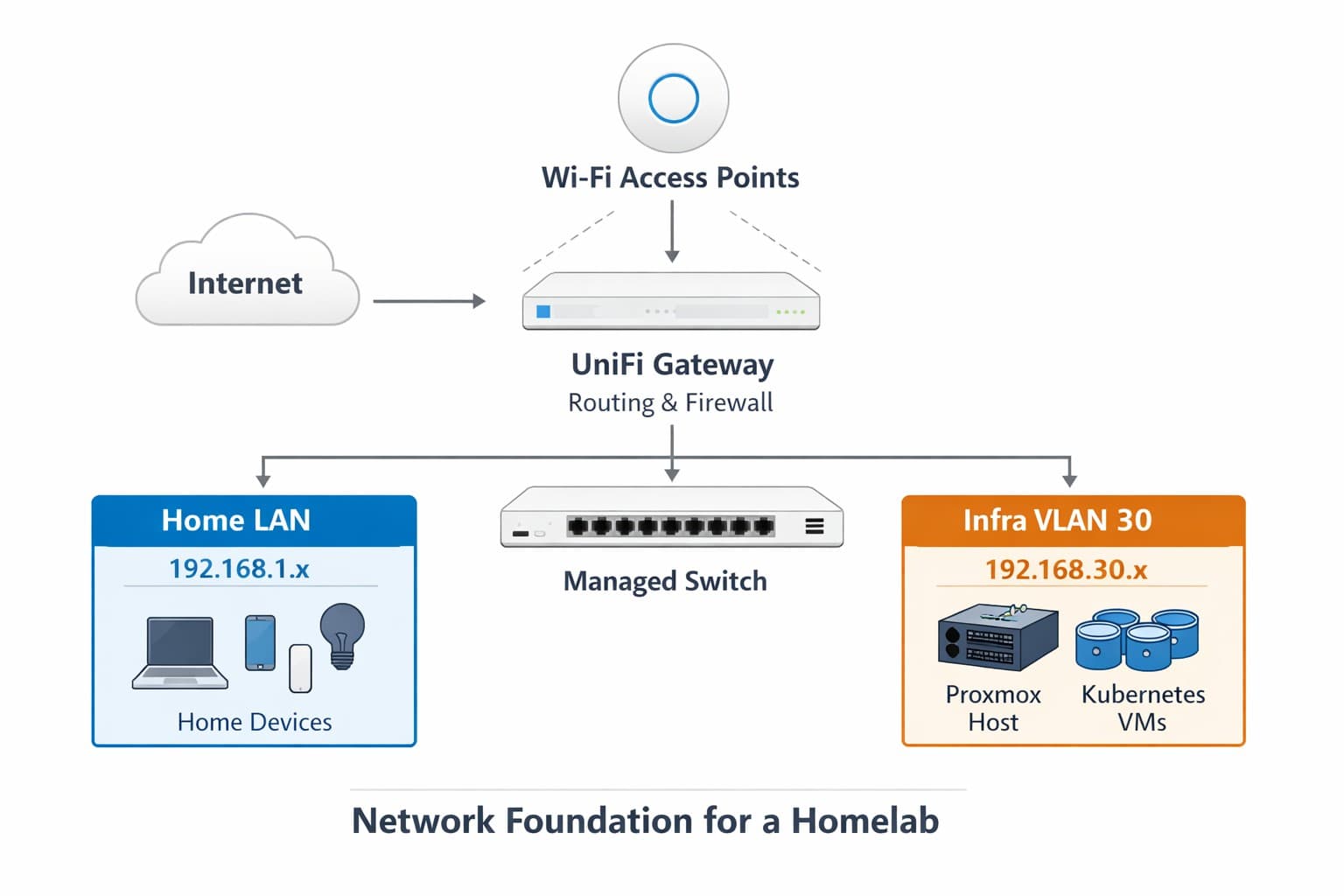
For a long time, my homelab network was built around a mix of consumer-grade gear. It worked fine for day-to-day internet usage, streaming, and basic devices. However the moment I tried to build something serious on top of it, the cracks showed fast.
This post is about why I replaced that setup with UniFi, what problems it immediately solved, and how that decision became the foundation for everything that followed: Proxmox, Kubernetes, ingress, storage, and GitOps.
Who This Post Is For
This post is for:
- Homelab builders moving beyond a flat home network
- Anyone planning to run Proxmox, Kubernetes, or both
- Engineers who want production-like networking at home
If you’re looking for step-by-step UniFi screenshots or exact port profile configs, those will come later.
This post is about why the network matters first, before diving into Proxmox bridges, trunking, and VLAN tagging.
The Problem With “It Works Fine”
My old network setup was good enough for:
- laptops
- phones
- smart TVs
- basic IoT devices
What it was not good at:
- VLANs
- predictable routing
- debugging traffic paths
- separating infrastructure from home devices
As soon as I started planning a Kubernetes homelab, I realized something important:
If the network is a black box, every Kubernetes issue looks the same.
I needed visibility, control, and consistency — not just “internet works.”
UniFi Hardware Overview
Before getting into VLANs and network design, it helps to understand the UniFi components involved.
This isn’t a product review, it’s a quick overview of the roles each device plays in the network.
UniFi Gateway
The gateway is responsible for:
- Routing between networks
- DHCP per VLAN
- Firewall rules and inter-VLAN access
- Acting as the control point for network policy
This is where the “network brain” lives.
UniFi Managed Switches
The switches are what made VLANs practical:
- End-to-end VLAN awareness
- Trunk links between switches
- Access ports for individual devices
- Visibility into tagged vs untagged traffic
Without managed switching everywhere, VLAN designs fall apart.
UniFi Access Points
Access points integrate directly with the same controller:
- SSIDs map cleanly to VLANs
- Wireless and wired devices follow the same network rules
- No special handling for Wi-Fi vs Ethernet
From the network’s perspective, Wi-Fi became just another access layer.
Why UniFi
I didn’t move to UniFi because it’s trendy. I moved because I needed:
- Managed switching
- First-class VLAN support
- Centralized visibility
- Real firewall rules
- A layout that mirrors production environments
UniFi hit the right balance:
- More capable than consumer gear
- Less heavy than full enterprise networking
- Opinionated enough to guide you, but flexible enough to break things (and learn)
Most importantly, UniFi makes network intent explicit.
Replacing the Old Gear
The transition wasn’t just a swap, it was a redesign.
What Changed
- Consumer switches → managed UniFi switches
- Flat network → segmented VLANs
- Implicit behavior → explicit configuration
- “Try things until it works” → traceable traffic paths
This was the first time I could look at my network and explain why traffic behaved the way it did.
Network Architecture: Before and After
To visualize the transformation, here's what the network looked like before and after the UniFi migration.
Before: Consumer Gear + Flat Network
After: UniFi + VLAN Segmentation
Introducing VLANs (The Real Turning Point)
Once UniFi was in place, VLANs stopped being theoretical and became practical.
In UniFi terms, this meant:
- Creating a new Network for infrastructure
- Assigning it VLAN ID
30 - Letting UniFi handle DHCP and routing for that subnet
- Applying firewall rules intentionally instead of relying on defaults
Nothing magical, just making the network explicit instead of implied.
Kubernetes VLAN
I created a dedicated VLAN specifically for infrastructure:
- VLAN ID:
30 - Subnet:
192.168.30.0/24 - Purpose: Proxmox host + Kubernetes nodes
This immediately gave me:
- Isolation from the home LAN
- Predictable IP addressing
- The ability to apply targeted firewall rules
- A clean boundary between “home” and “lab”
Kubernetes no longer lived “somewhere on my network”, it lived in its own environment.
UniFi Concepts That Show Up Later
I don’t configure everything in this post, but these concepts come up repeatedly in future posts:
- Networks – VLAN-backed subnets with their own DHCP and firewall rules
- Port Profiles – Where access vs trunk behavior is defined
- Tagged vs Untagged VLANs – Critical when working with Proxmox
- Inter-VLAN Routing – Explicitly allowed, never assumed
If these feel fuzzy right now, that’s okay the diagrams above are the important part.
Managed Switching: Why It Matters More Than You Think
One of the most painful lessons came early:
Unmanaged switches silently break VLAN designs.
Before fully swapping my gear, part of the network path still went through an unmanaged switch. The result was subtle and brutal:
- VLAN tags stripped
- Devices appearing on the wrong subnet
- Proxmox UI randomly unreachable
- Kubernetes nodes getting unexpected IPs
Everything looked connected. Nothing worked correctly.
Once every switch in the path was managed, those issues disappeared immediately.
Trunks, Access Ports, and Intent
UniFi made a crucial distinction obvious: trunk vs access ports.
Trunk Ports
Used between switches and upstream devices:
- Carry multiple VLANs
- Native (untagged) LAN traffic
- Tagged Kubernetes VLAN traffic
Access Ports
Used for individual devices:
- Untagged VLAN only
- No VLAN tagging at the device level
This mattered later with Proxmox:
VLAN tagging happens at the switch not inside the VM.
Double-tagging VLANs was one of the biggest early mistakes, and UniFi’s visibility made it obvious once I knew where to look.
Routing and Firewall Rules
With VLANs in place, routing became intentional instead of accidental.
UniFi handled:
- Inter-VLAN routing
- DHCP per network
- Firewall enforcement
This also explained something that confused me early on:
- Some services worked from Wi-Fi
- The same services failed from wired clients
Different networks, different rules and now I could see that.
IoT Security: The Unexpected Win
One of the most practical benefits of moving to UniFi and VLANs was finally solving the IoT security problem.
The Problem Before VLANs
On a flat network, every IoT device had full access to everything:
- Smart plugs could reach my laptop
- Security cameras had access to file servers
- Random gadgets could talk to infrastructure
This isn't theoretical paranoia it's terrible security posture.
The Solution: IoT VLAN + Firewall Rules
With UniFi, I created a dedicated IoT network:
- VLAN ID:
40 - Subnet:
192.168.40.0/24 - Default behavior: No access to anything else
Then I added explicit firewall rules for what IoT devices actually need:
Allow: IoT VLAN → Internet (outbound only)
Allow: Default LAN → IoT VLAN (so you can manage devices)
Block: IoT VLAN → Default LAN
Block: IoT VLAN → Kubernetes VLAN
Suddenly, IoT devices were:
- Reachable from my phone/laptop (when I need to configure them)
- Able to reach their cloud services
- Completely isolated from everything else
Home Assistant Changes Everything
Here's where it gets interesting: Home Assistant bridges the gap securely.
I run Home Assistant on a Raspberry Pi on the Default LAN, but with a critical exception:
- A firewall rule allows the Pi's MAC address to communicate with the IoT VLAN
- This is the only device on the Default LAN with that privilege
- IoT devices cannot reach the Default LAN or Kubernetes VLAN directly
- My phone/laptop talks to Home Assistant (on the LAN), which then controls IoT devices
The flow looks like this:
Phone (Default LAN) → Home Assistant (Default LAN) → IoT Devices (IoT VLAN)
                      [Firewall exception by MAC address]
Home Assistant becomes the controlled access point, not just a dashboard.
What This Actually Looks Like
With firewall rules in place, I can:
- Control lights, plugs, and sensors through Home Assistant
- Block IoT devices from scanning the network
- Let IoT devices reach their cloud APIs (if needed)
- Monitor everything from the UniFi controller
If a device gets compromised, it's trapped on VLAN 40 with no way to reach anything else.
Why This Matters for Homelabs
If you're running infrastructure at home, IoT isolation isn't optional:
- Cheap IoT devices have terrible security
- Your Kubernetes cluster is a high-value target
- Mixing trusted and untrusted devices on the same network is asking for trouble
VLANs let you keep the convenience without the risk.
Home Assistant works just as well (better, even), and your network is no longer a free-for-all.
Validating the Network (My Go-To Checks)
Once things were configured correctly, I stopped guessing and started validating.
Some checks I used constantly:
- Can I ping a Kubernetes node from my desktop?
- Can I reach a NodePort from outside the VLAN?
- Does ingress respond when I force the Host header?
Example:
curl http://192.168.30.120:31929 -H "Host: argocd.k8s.local"
If that worked, the network was correct.
If it didn’t, Kubernetes wasn’t the problem yet.
That single check saved me hours of debugging in higher layers.
What UniFi Ultimately Gave Me
After the migration, I had:
- Clear network boundaries
- Predictable routing
- VLAN-aware switching everywhere
- The ability to debug ingress and NodePorts properly
- A foundation that behaved like real infrastructure
Most importantly, I stopped blaming Kubernetes for network problems that weren't Kubernetes problems.
Lessons Learned
- Consumer networking gear hides problems
- VLANs force clarity (and that's a good thing)
- Managed switches are non-negotiable for labs
- If networking is flaky, everything above it is noise
- UniFi doesn't prevent mistakes it makes them visible
Hardware Used in This Setup
For reference, my setup currently includes:
- UniFi Gateway (routing, firewall, VLANs)
- UniFi managed switches (core and access)
- UniFi access points for Wi-Fi coverage
The specific models aren’t critical, what matters is that every hop in the path is VLAN-aware and centrally managed.
What's Next
Think of this post as the network foundation.
Everything that follows: Proxmox bridges, VLAN trunks, Kubernetes ingress, and storage only works cleanly because the network is no longer guessing.
With UniFi in place, I could finally move forward confidently:
- Proxmox networking stopped being mysterious
- Kubernetes nodes behaved predictably
- Ingress, storage, and GitOps started to make sense
Check out our Kubernetes Homelab series of posts if interested in setting up your own homelab.
Real-World Platform Engineering in Your Inbox
One email a week. Deep dives on Kubernetes, homelab builds, platform tooling, and building in public from someone who does this for a living.
No fluff, no sponsored blasts. Unsubscribe any time.
Reach Engineers Who Build Platforms
My readers are Staff Engineers, Platform Engineers, and DevOps/SRE leads — the people who evaluate, buy, and recommend infrastructure tooling at their companies.
- → Sponsored posts, newsletter placements, and resource page features available
- → Audience: platform engineering, Kubernetes, GitOps, and homelab builders
- → Formats tailored to technical audiences — no generic ad copy
Related Posts
Proxmox for a Realistic Kubernetes Homelab (VLANs, Networking, and Gotchas)
How I set up Proxmox and UniFi networking to support a production-like Kubernetes homelab, including VLANs, firewall pitfalls, and lessons learned.
Kubernetes on Proxmox: DNS and LoadBalancers with MetalLB
Add real DNS and LoadBalancer services to a homelab Kubernetes cluster using MetalLB and local DNS integration.
Monitoring My Homelab with Grafana: From Proxmox to Kubernetes
A practical, beginner-friendly observability setup for a two-host Proxmox homelab: Prometheus + Grafana in Kubernetes, scraping Proxmox hosts and Pi-hole.